
With the amount of data available to all marketing and sales employees, as well as the ease of access to it, they are sometimes expected to report on absolutely everything: website visits, leads generated, conversions, social media interactions, form submissions, contacts generated, sales opportunities, revenue generated - the list goes on!
The thing is, all of these metrics contribute to the overall picture, and when combined as a single view, they allow marketing and sales departments to understand the effectiveness and performance of their marketing and sales activities.
However, achieving a consistent end-to-end view of those activities is a major challenge for most - even with the advanced analytics that exist today.
As a result, many marketing and sales departments acquire disconnected and disparate tools to help them manage and analyse all these individual metrics, but over time it becomes increasingly difficult to compile reports in an timely and orderly fashion.
Some marketers spend up to an hour a day, according to HubSpot, analysing data from the reporting tools they use, connecting individual reports from each of them to get a single, trusted view of marketing performance.
And even after extracting the data from these tools, they still need to insert it into an Excel spreadsheet or PowerPoint so that they can share it with their marketing director, CEO and the board to justify expenditure!
You might just be in this position, or you might just be using HubSpot’s standard reporting tools but struggling to create the specific reports you want.
Either way, being able to report on all of your business’ marketing (and sales) activity across channels and with forensic accuracy is essential. A holistic view of all your marketing will enable you to make data-driven decisions across campaigns and, ultimately, demonstrate return on investment.
Fortunately, HubSpot has you covered with its reporting add-on - but what is it?
What is the HubSpot reporting add-on?
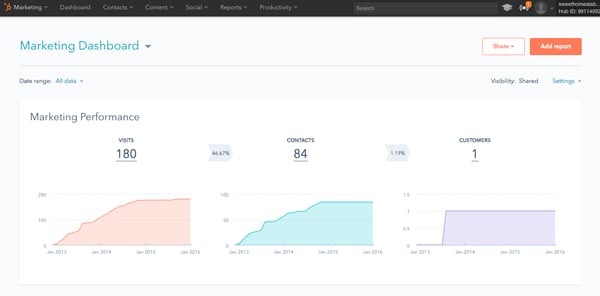
Unlike HubSpot’s standard reporting tool, which provides your entire business with just a single, fixed dashboard, the HubSpot reporting add-on allows you to create up to 200, individual reporting dashboards. These dashboards are centralised and fully customisable, and allow you to report on virtually any metric from your HubSpot Marketing, any record from your HubSpot CRM, or data from any of the integrated apps you may be using.
The HubSpot reporting add-on also provides you with a library of commonly used reporting templates, as well as the ability to build your own custom reports from scratch and choose how you want to slice and display the data, so you can display any information you want!
Check out the differences between the standard reporting dashboard and the reporting add-on:
HubSpot's standard reporting dashboard
HubSpot's reporting add-on dashboard
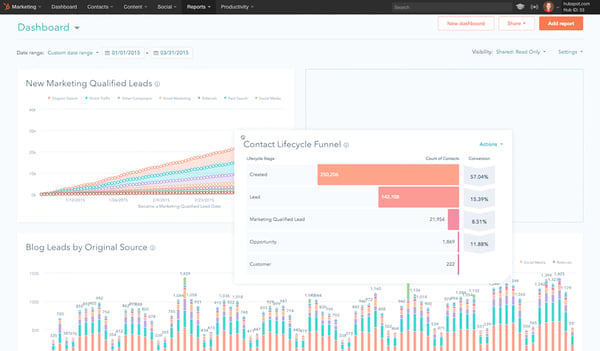
Being able to create individual dashboards for users means that everyone can have their own default view which is incredibly useful. For example, a marketing director might want to have a dashboard specifically for leads generated, whereas a marketing executive might want to see blog views, subscriptions and social media mentions. As these dashboards are unique to users, there’s no overlap!
Another neat feature is that you can insert notes onto your dashboards to give your team context about the report - which is also useful when it comes to presenting the report to your marketing director, CEO or board - and you can send reports directly to your teammates on a rotating schedule, either daily, weekly or monthly to ensure everyone is on track and aware of progress.
The reporting add-on is available for £151.23/month ($200), and you can start a free 10-day trial to start building reports and familiarising yourself with the add-on.
Having all of your marketing and sales data in one place will allow you to build a single version of the truth and easily see how all of your efforts come together to generate revenue for the business.
HubSpot’s standard reporting is a step in the right direction but if you want extensive and editable reporting all in one place, the reporting add-on is certainly worth considering. Instead of spending time connecting reports from different tools and inserting information into an Excel or PowerPoint, just use the reporting add-on and share your reports with your team, marketing director and board with ease.
Want to find out more about the HubSpot reporting add-on? Click here.
If you need help with your reporting process and building custom reports to demonstrate specific aspects of your marketing activity, we can help!






.png?width=500&height=320&name=Image_1__How_to_Get_Your_Brand_Cited_in_AI_Search_in_6_Simple_Steps_(2026).png)