When you’re starting from the bottom as a salesperson in a start-up, it seems easy to win business. However, as the business begins to grow, things will get harder. Those leads and prospects become harder to find and close, while your company's overheads are only going up.
At this point, you’re officially in ‘scale-up mode’ and it’s time to step up and shine. The pressure is on to increase the volume of sales. But how do you keep the sales cycle short and become more efficient with leads to keep the momentum going?
Well, the answer is HubSpot's Sales tools - which enable your sales team to nurture, engage and close your leads and prospects.
However, HubSpot has announced some important updates regarding the structuring of its sales tools. There will be three tiers of the sales product:
-
HubSpot Free CRM tool
-
HubSpot Sales Starter
-
HubSpot Sales Professional
So what’s included within the HubSpot Sales Starter?
HubSpot Sales Starter is for small, growing teams, and includes the following functionality for $50 a month:
-
Core CRM - access to the core HubSpot CRM features
-
Send Later - the ability to schedule 1:1 emails to go out at a specified time in the future
-
Team - the ability to create a single team of HubSpot users
-
Multiple Deal Pipelines - the ability to create up to two deal pipelines
-
Templates - Unlimited email templates to choose from
-
Sequences - Unlimited email sequences to put contacts on
-
Documents - Unlimited documents to send your contacts and track engagement
-
Meetings - Unlimited meetings link to remove the pain of finding a time that works for all parties
-
Live Chat - Access to messages (live chat) on your website
-
Calling - 500 minutes per month per user
-
Notifications - Unlimited notifications on contact activity
And what’s included within the HubSpot Sales Professional?
HubSpot Sales Professional is for professional teams who are ready to scale up their operations and transform a simple sales process into a revenue-generating sales engine, for $400 a month for a team of five.
HubSpot Sales Professional includes everything in HubSpot Sales Starter, with these additional features:
-
Calling - 2,000 minutes per month
-
Multiple Deal Pipelines - the ability to create unlimited deal pipelines
-
Teams - the functionality to create multiple teams in HubSpot
In addition to these differences, HubSpot Sales Professional users have access to the following tools:
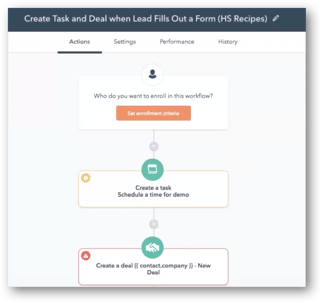
Sales Workflows -
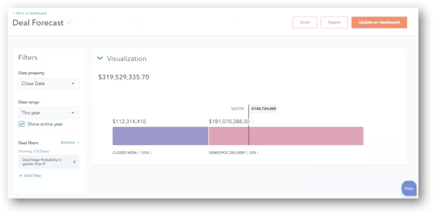
With sales workflows, you can do basic tasks and deal automation using workflows. This tool will not include the email functionality that’s included within the marketing tool but will allow you to create workflows in order to automate task designation and deal creation.
Sales Reporting -
With HubSpot Sales Professional, you will have access to unlimited custom reports as well as one dashboard to view and manage your reporting. If you want more than one dashboard to report with, you’ll need to purchase the reporting add on.
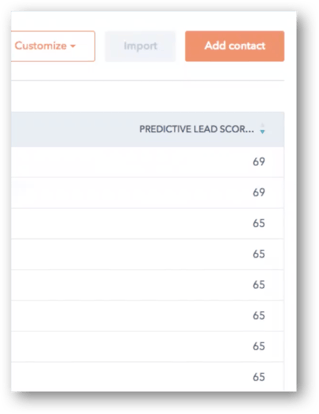
Predictive Lead Scoring -
We understand it’s sometimes difficult to prioritise which contacts you should reach out to, in which order. Sales predictive lead scoring helps with this. It’s a different tool from the tool within the marketing part of the software, as its algorithm is built to be used with small data sets.
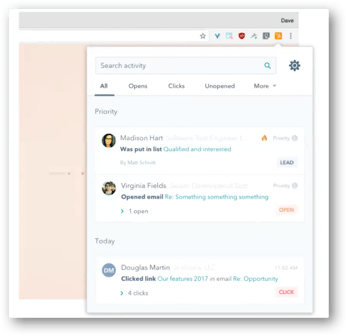
Smart Notifications -
Along with predictive lead scoring, smart notifications will highlight your most qualified leads and pinpoint the best time to reach out to them, rather than just giving you a list of the most recent activity.
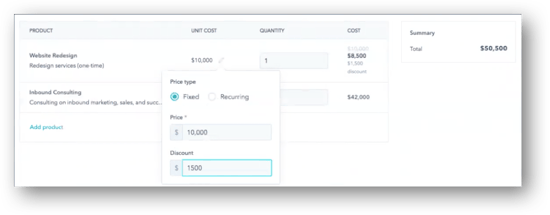
Products Tool -
This is a completely new tool within the HubSpot Sales system. The Products tool will allow you to report on the actual products that you’re selling, letting reps associate deals with the product that they are actually selling, so that teams and managers can report on product-specific data.
How much does each sales product cost?
HubSpot Free CRM tool
This tool is completely free forever!
HubSpot Sales Starter
HubSpot Sales Starter is now a $50 a month per user version of the sales tool.
HubSpot Sales Professional
HubSpot Sales Professional is $400 for a team of five users. There will be a discounted rate between the Inbound2017 event, which starts on 25 September, and 1 November, when you’ll be able to get the tool at $50 a month per user. If you need more than five users, it is $80 a month for each additional user.
HubSpot will roll out this functionality and more information on pricing for existing HubSpot Sales users between now and 1 November. Keep checking our blog for more information about the sales tools between now and then!
In addition, we run monthly HubSpot Training courses for both the Marketing and Sales software. For more information and to download the training agenda, please click here.

.png?width=500&height=320&name=Image_1__How_to_Get_Your_Brand_Cited_in_AI_Search_in_6_Simple_Steps_(2026).png)