Today’s customer is much smarter and more resourceful – and has access to a number of different solutions that will solve their business pain. Thanks to the Internet, your customers can easily educate themselves, researching your products and services against your competitors’ before they make an informed decision.
"You love your customers, but it’s getting harder and harder to keep them happy."
The modern customer has all the power and expects businesses to be able to meet their needs and demands.
But these expectations aren’t being met. Customers are often frustrated and perplexed by how some businesses treat them. Customer service and support teams deal with them in a nonchalant, abrasive and dismissive way, progressively “working” their way through – what seems to them to be – ‘tickets’ in a queue.
The thing is, your customers are people; not tickets, not queues and not numbers. They want to be treated like humans and to get assistance whenever and however they need it.
Customers want businesses to understand and address their issues. Meeting this need will not only help customer retention, but also drive business. It’s important to appreciate the fact that happy customers will grow your business faster than sales and marketing.
So, HubSpot has developed a new tool…
Introducing HubSpot Customer Hub
Coming in Q4 of 2017, “HubSpot Customer” is a brand new platform that will sit alongside Marketing and Sales on the dropdown menu. HubSpot Customer Hub is designed to empower customer service teams, giving them the means to understand customers, help customers, measure customer satisfaction and to grow the business through its Customer Hub.
HubSpot Customer Hub will eventually include tools to help customer support teams, such as:
-
NPS, to help understand customers
-
Knowledge bases
-
Retention forecasting
-
Sentiment analysis
and much, much more.
In addition, the HubSpot Customer Hub tool will also include a tool called “HubSpot Conversations”.
What is HubSpot Conversations? And where has it come from?
First, some context.
The way that we communicate has changed.
CHAT – IS – BACK.
As the world has become increasingly mobile and immediate, the way in which we communicate with each other has evolved too. We have moved on from lengthy, detailed emails to short, concise and emoji-filled messages. Instant messaging has quickly taken over as the main form of communication. From the birth of MSN Messenger many, many years ago, to Facebook Messenger, Twitter, Google Hangouts, WhatsApp and Slack, we now have more applications to support conversation than ever.
And yet, why aren’t we communicating with our prospects, leads and customers in the same way?
Well, now we can!
HubSpot Conversations is an all-in-one inbox for all of your one-to-one communications with prospects, leads and customers. It provides a seamless and straightforward platform for engagement.
But what does that actually mean?
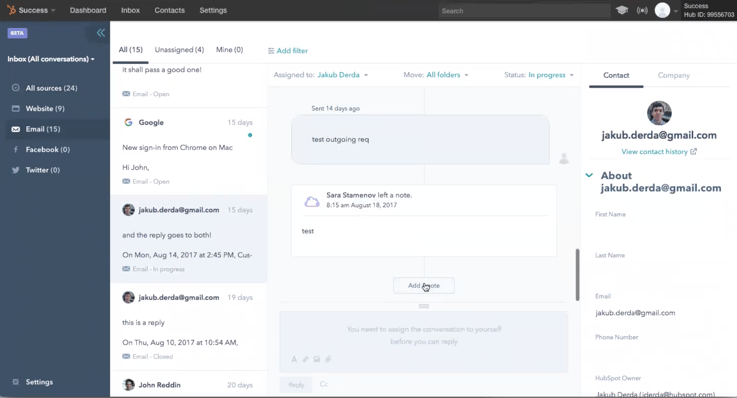
It means that you’ll have one inbox for all of your conversations. HubSpot Conversations has all of the communication channels built in: your website, email, Facebook and Twitter. From the HubSpot Conversations platform, you can readily communicate with your prospects – and easily access a contact’s information directly from the interface, from information about the forms they have completed, to details about the web pages they’ve viewed.
Also, each team has its own space or ‘team’ area and you can assign, collaborate and manage different conversations with ease – meaning no overlap or mix-ups between conversations.
The screenshot below shows how you can filter conversations by messages or by a specific source such as your website, email, Facebook or Twitter.
HubSpot Conversations will be available to all HubSpot users as a free tool, but we expect that a paid version of the tool, with additional features, will be made available shortly in the not so near future.
What’s next?
Just to recap – HubSpot are releasing HubSpot Customer Hub, which will sit alongside Marketing and Sales on the main dropdown menu for free.
As part of the HubSpot Customer Hub tool, you will also have HubSpot Conversations, which will sit in your portal and can be used to communicate with any contacts within your database. At the moment, the Conversations tool enables you to contact people via email, live chat, Twitter and Facebook Messenger, but HubSpot will undoubtedly implement new channels once the tool goes live in Q4, 2017.
If you want to keep an eye out for the HubSpot HubSpot Customer Hub and Conversation tools, simply sign up to our blog in order to be notified of any product releases and updates.