Many companies provide personalised experiences via their website in 2019 - which for years previously had been exclusive to companies that could afford an enterprise-level content management system (CMS).
Amazon, for example, has been providing personalised experiences for years. Its website would collect information on website visitors - namely their previous search and purchase behaviour - to then offer those visitors products they might be interested in.
Back then, website personalisation required a top-range CMS. Today in 2019, providing personalised experiences to your website visitors is business as usual. If you're not providing a personalised experience - you can bet your competitors are.
Using ‘smart content’, or other methods of personalisation, you can modify your website to create tailored experiences for visitors. The main benefit of this is increased visitor engagement. After all, your prospects want to see content that they are interested in.
But what exactly is personalisation and how does it work?
First of all, website personalisation allows you to tailor your website for website visitors based on information you have on them. Information is captured through cookies that are placed on the visitor's web browser. These cookies allow your CMS to track the activity of visitors and known leads on your website.
Website personalisation works in a variety of ways. Below are just a few examples of personalised content (you may have seen or experienced some of them before):
-
Being shown ‘products you might be interested in’ when purchasing items online.
-
Being shown different pieces of content based on pages you’ve viewed previously.
-
Websites having your name and company name on them.
For the exact reason all your customers and prospects are not the same, your website should also not appear the same for all. A static website would not stand out to your visitors and will likely to fail to attract suitable buyers - and that is a missed opportunity. Considering most of your prospects meet your website before they meet you, it is important that they see and believe it has exactly what they are looking for.
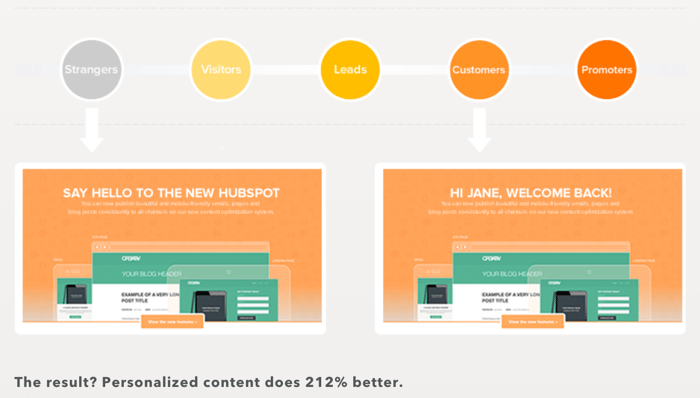
Check out the HubSpot example below. It's simple but effective. Based on who the visitor is, and how far along the sales cycle they are, the website communicates with them in a different way and provides other content.
HubSpot example:
So how can you provide personalised experiences to your website visitors?
1. Personalise based on recent website activity
Granted you use a CRM that is able to capture information about a contact’s recent activity, you can set content on a page to change depending on who is viewing it.
For example, if a contact has already downloaded a specific eBook on your website, you might want to show them a different piece of content so you're not promoting the same asset. It’s also a chance for you to look at the information you have on them and what they have expressed interest in previously, and show that instead.
2. Personalise based on the referral source of the website visitor
A lead's referral source - i.e. how they arrive on your website (organic search, email, paid social, etc) - is incredibly important and helps to determine intent. For example, if a visitor's referral source is paid search, they are likely to be more educated and looking to make a purchase.
3. Personalise based on which country they are visiting from
Have an international website? It’s probably best to tailor your content based on the geolocation of your visitor’s device! This is a great way to appeal to prospects from different countries as they are likely to be interested in what your business offers for them specifically. For example, if you have an event running in a specific country, you'll want to promote that event to contacts in that country.
4. Personalise based on whether they are a customer
You should also tailor your messaging for when customers land on your website. Chances are they've been a prospect on it before, having been marketed and sold to, so they would be delighted to find content slightly different to what they have seen already.
You could, for instance, show them a product or service similar to what they have previously purchased. You could also replace a content offer that is displayed to leads with a CTA that links customers to a review page where they can leave feedback instead (which would be highly useful for you).
5. Personalise based on where they are in the sales cycle
Not all leads are the same. Some are a lot more engaged than others and have different experiences and interests in regards to your business. For instance, if they are a lead that has downloaded just one eBook, you might want to educate them on a topic further. If they're an "opportunity", you might want to focus on your brand and reasons why they should work with you - perhaps direct them to relevant case studies.
6. Personalise based on device type
Some types of content are just more conveniently consumed on certain devices. If a prospect is viewing your content on their mobile, for example, a video would be better suited to meet their needs than long blocks of text.
7. Personalise based on any contact list membership
Having segmented your contact data into lists, you can also personalise based on list membership. You can segment data on any information you wish. With lists, the choices are many - from contact properties such as first name to activities such as form submissions! Once you have a list with your chosen criteria, you can show what you wish to that particular list of contacts on a page.
Website personalisation is often used on B2C e-commerce websites because it just works so well. It’s a no-brainer that everyone wants content that is very relevant to them; we want to find what we are looking for and we want to find it fast. So, similarly website personalisation can work effectively for B2B companies as well. Website personalisation takes careful segmentation of your audience and the creation and distribution of the right content to reach prospects and win new business.
.png?width=500&height=320&name=Image_1__How_to_Get_Your_Brand_Cited_in_AI_Search_in_6_Simple_Steps_(2026).png)